> For the complete documentation index, see [llms.txt](https://docs.flightsim-studio.com/llms.txt). Markdown versions of documentation pages are available by appending `.md` to page URLs; this page is available as [Markdown](https://docs.flightsim-studio.com/e-jet-series/normal-procedures/preflight-setup.md).
# Preflight Setup (Quick Guide)
Step-by-step MCDU preflight from **RADIO** through a complete route, departure and arrival procedures, performance initialization, and takeoff speeds.
Example route: **EGLC/27** N0317F210 ODUK1A ODUKU M84 CLN P44 RATLO M197 REDFA REDF1A **EHAM/18R** (SimBrief / datalink import).
{% hint style="info" %}
Complete **NAV IDENT** once before using **RTE**, **FPL**, or **PERF** (verify the AIRAC cycle; update via [Navdata Updater](https://docs.flightsim-studio.com/e-jet-series/special-features/electronic-flight-bag/navdata-updater) if needed). Store your SimBrief username or userid before route import ([SimBrief Import](https://docs.flightsim-studio.com/e-jet-series/mcdu-guide/simbrief-import)). Keep the **EFB manifest** open for ZFW, fuel, **TO CG**, and V-speeds.
{% endhint %}
{% hint style="danger" %}
On **PERF INIT 3/3**, you must press **CONFIRM INIT>** before the FMS calculates the vertical profile (TOC/TOD) and VNAV data.
{% endhint %}
## Step 1
{% columns %}
{% column width="64%" %}
1. Enter the airport ground/delivery frequency (or the first frequency you will contact) on **RADIO**.
2. Enter the follow-up frequency in standby.
3. Press **RTE**.
{% endcolumn %}
{% column width="36%" %} 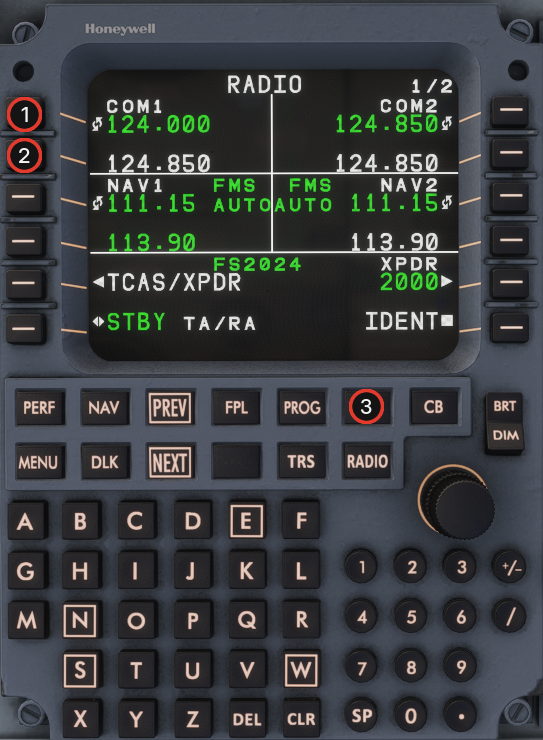 {% endcolumn %}
{% endcolumns %}
## Step 2
{% columns %}
{% column width="64%" %}
1. Open **NAV IDENT** and verify the loaded navdata cycle against the current date.
2. If navdata is out of date, follow the [Navdata Updater](https://docs.flightsim-studio.com/e-jet-series/special-features/electronic-flight-bag/navdata-updater) process (**EFB → Settings → Navdata**, or the desktop fallback).
{% endcolumn %}
{% column width="36%" %}
{% endcolumn %}
{% endcolumns %}
## Step 2
{% columns %}
{% column width="64%" %}
1. Open **NAV IDENT** and verify the loaded navdata cycle against the current date.
2. If navdata is out of date, follow the [Navdata Updater](https://docs.flightsim-studio.com/e-jet-series/special-features/electronic-flight-bag/navdata-updater) process (**EFB → Settings → Navdata**, or the desktop fallback).
{% endcolumn %}
{% column width="36%" %} 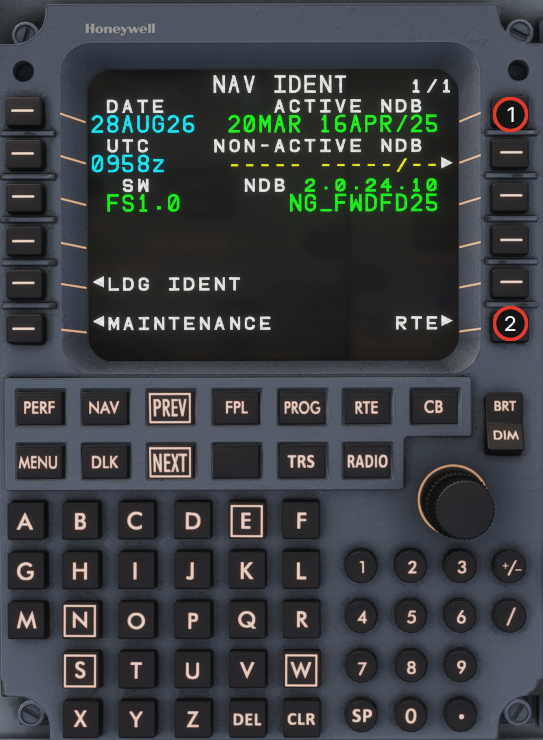 {% endcolumn %}
{% endcolumns %}
## Step 3
Import the route on **RTE** as described in [SimBrief Import](https://docs.flightsim-studio.com/e-jet-series/mcdu-guide/simbrief-import).
1. **Option 1:** Enter the departure and destination ICAO and activate. Then press **DLK PFL** (LSK 3L) to request the flight plan.
2. **Option 2:** Enter **CO ROUTE** as departure ICAO + destination ICAO + release, for example `KORDKSFO01`. The release number is in the SimBrief Flight Plan Summary (`01` for the first generated plan).
## Step 4
{% columns %}
{% column width="64%" %}
1. Review the imported route on the flight plan.
2. **ACTIVATE** (LSK 6R) to make the route active.
{% endcolumn %}
{% column width="36%" %}
{% endcolumn %}
{% endcolumns %}
## Step 3
Import the route on **RTE** as described in [SimBrief Import](https://docs.flightsim-studio.com/e-jet-series/mcdu-guide/simbrief-import).
1. **Option 1:** Enter the departure and destination ICAO and activate. Then press **DLK PFL** (LSK 3L) to request the flight plan.
2. **Option 2:** Enter **CO ROUTE** as departure ICAO + destination ICAO + release, for example `KORDKSFO01`. The release number is in the SimBrief Flight Plan Summary (`01` for the first generated plan).
## Step 4
{% columns %}
{% column width="64%" %}
1. Review the imported route on the flight plan.
2. **ACTIVATE** (LSK 6R) to make the route active.
{% endcolumn %}
{% column width="36%" %} 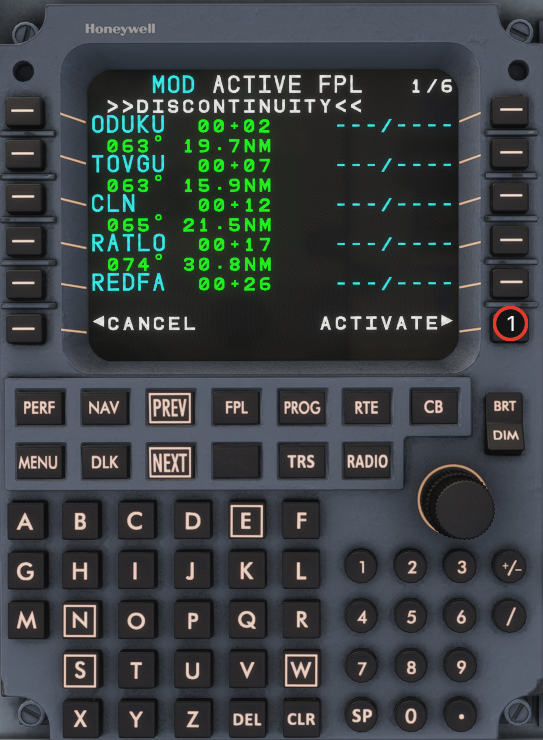 {% endcolumn %}
{% endcolumns %}
## Step 5
{% columns %}
{% column width="64%" %}
1. On **ACT RTE**, select **DEPARTURE>** (LSK 6R) to open departure procedures.
{% endcolumn %}
{% column width="36%" %}
{% endcolumn %}
{% endcolumns %}
## Step 5
{% columns %}
{% column width="64%" %}
1. On **ACT RTE**, select **DEPARTURE>** (LSK 6R) to open departure procedures.
{% endcolumn %}
{% column width="36%" %} 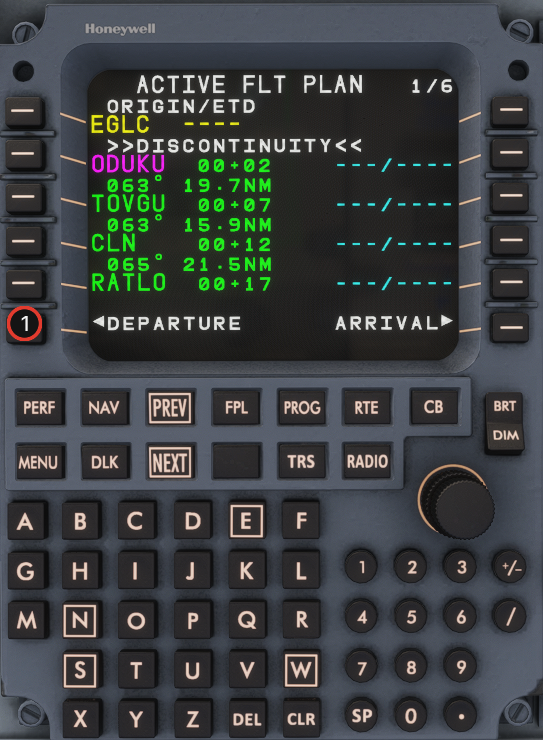 {% endcolumn %}
{% endcolumns %}
## Step 6
{% columns %}
{% column width="64%" %}
1. Open runway selection for the departure airport.
{% endcolumn %}
{% column width="36%" %}
{% endcolumn %}
{% endcolumns %}
## Step 6
{% columns %}
{% column width="64%" %}
1. Open runway selection for the departure airport.
{% endcolumn %}
{% column width="36%" %} 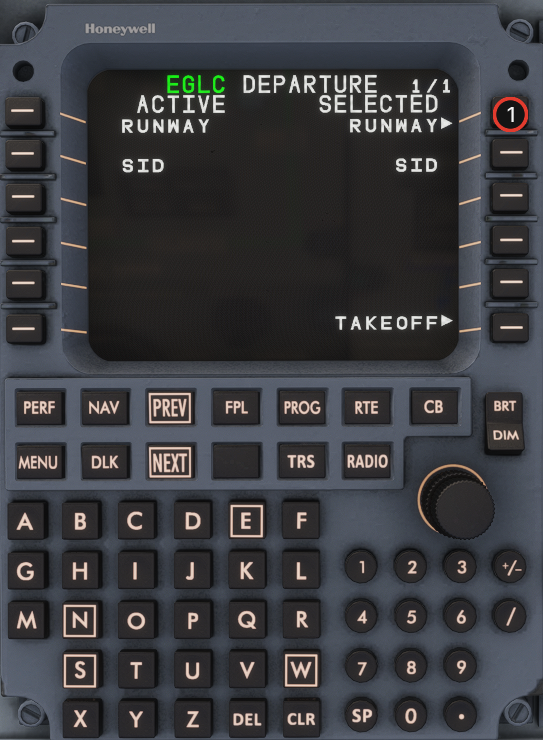 {% endcolumn %}
{% endcolumns %}
## Step 7
{% columns %}
{% column width="64%" %}
1. Select the planned departure runway.
{% endcolumn %}
{% column width="36%" %}
{% endcolumn %}
{% endcolumns %}
## Step 7
{% columns %}
{% column width="64%" %}
1. Select the planned departure runway.
{% endcolumn %}
{% column width="36%" %} 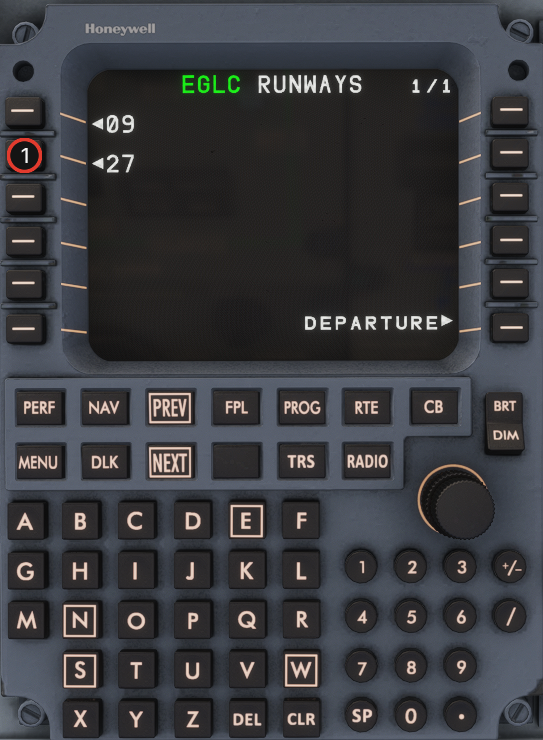 {% endcolumn %}
{% endcolumns %}
## Step 8
{% columns %}
{% column width="64%" %}
1. Select the planned SID.
{% endcolumn %}
{% column width="36%" %}
{% endcolumn %}
{% endcolumns %}
## Step 8
{% columns %}
{% column width="64%" %}
1. Select the planned SID.
{% endcolumn %}
{% column width="36%" %} 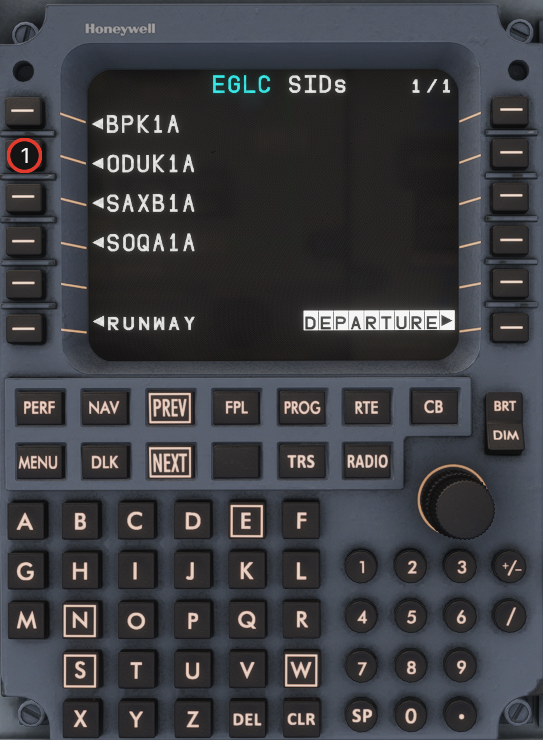 {% endcolumn %}
{% endcolumns %}
## Step 9
{% columns %}
{% column width="64%" %}
1. Confirm the selected departure procedure.
{% endcolumn %}
{% column width="36%" %}
{% endcolumn %}
{% endcolumns %}
## Step 9
{% columns %}
{% column width="64%" %}
1. Confirm the selected departure procedure.
{% endcolumn %}
{% column width="36%" %} 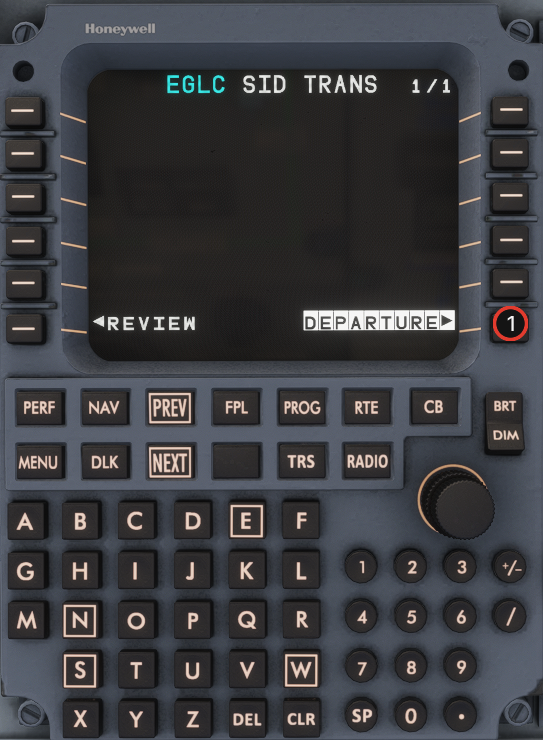 {% endcolumn %}
{% endcolumns %}
## Step 10
{% columns %}
{% column width="64%" %}
1. **INSERT/APPLY** the departure procedure into the **MOD** flight plan.
{% endcolumn %}
{% column width="36%" %}
{% endcolumn %}
{% endcolumns %}
## Step 10
{% columns %}
{% column width="64%" %}
1. **INSERT/APPLY** the departure procedure into the **MOD** flight plan.
{% endcolumn %}
{% column width="36%" %} 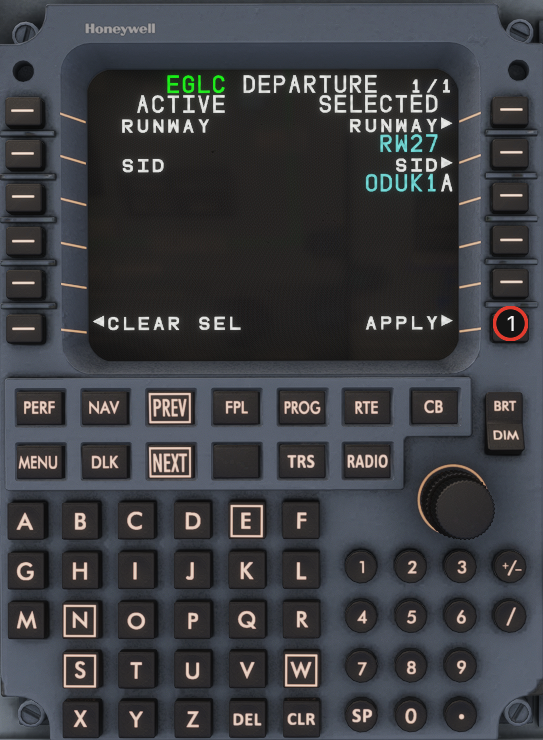 {% endcolumn %}
{% endcolumns %}
## Step 11
{% columns %}
{% column width="64%" %}
1. Review the **MOD ACTIVE FPL**.
2. **ACTIVATE** (LSK 6R) to make the departure procedure active.
{% endcolumn %}
{% column width="36%" %}
{% endcolumn %}
{% endcolumns %}
## Step 11
{% columns %}
{% column width="64%" %}
1. Review the **MOD ACTIVE FPL**.
2. **ACTIVATE** (LSK 6R) to make the departure procedure active.
{% endcolumn %}
{% column width="36%" %} 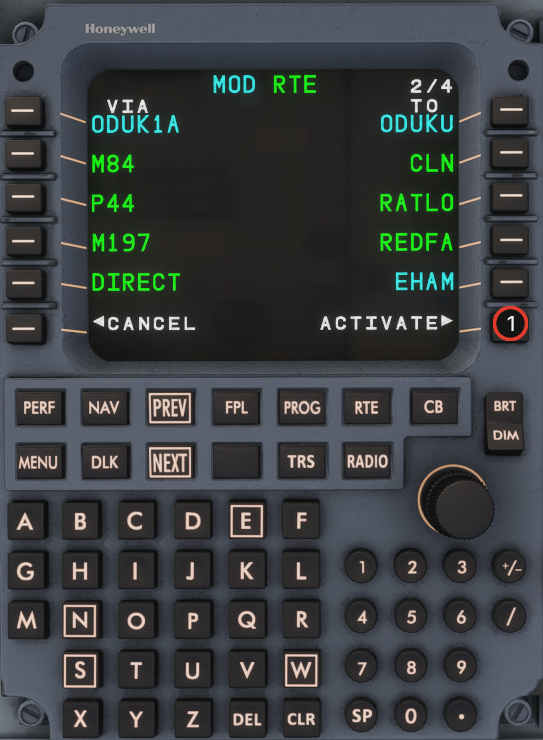 {% endcolumn %}
{% endcolumns %}
## Step 12
{% columns %}
{% column width="64%" %}
1. Return to **ACT RTE** and select **ARRIVAL>** (LSK 6R).
{% endcolumn %}
{% column width="36%" %}
{% endcolumn %}
{% endcolumns %}
## Step 12
{% columns %}
{% column width="64%" %}
1. Return to **ACT RTE** and select **ARRIVAL>** (LSK 6R).
{% endcolumn %}
{% column width="36%" %} 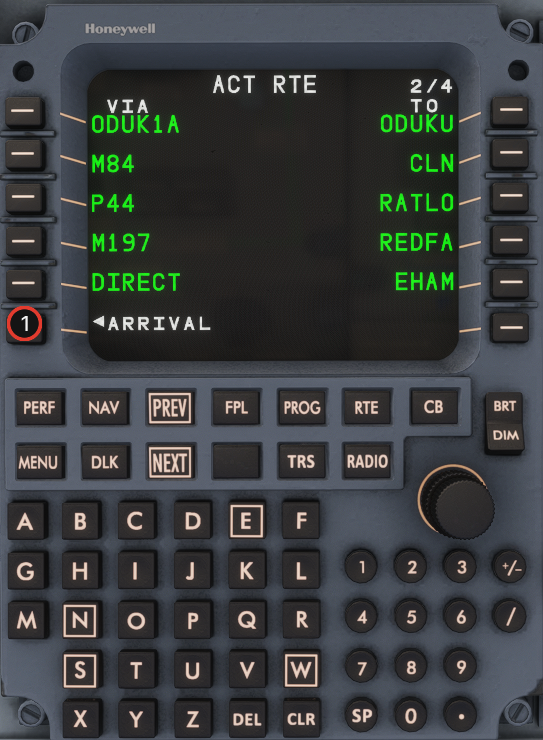 {% endcolumn %}
{% endcolumns %}
## Step 13
{% columns %}
{% column width="64%" %}
1. Open runway selection for the arrival airport.
{% endcolumn %}
{% column width="36%" %}
{% endcolumn %}
{% endcolumns %}
## Step 13
{% columns %}
{% column width="64%" %}
1. Open runway selection for the arrival airport.
{% endcolumn %}
{% column width="36%" %} 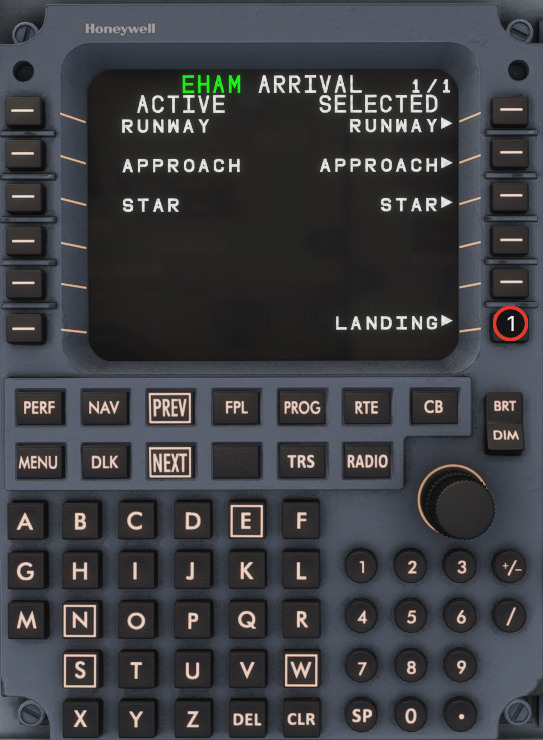 {% endcolumn %}
{% endcolumns %}
## Step 14
{% columns %}
{% column width="64%" %}
1. Select the planned arrival runway.
{% endcolumn %}
{% column width="36%" %}
{% endcolumn %}
{% endcolumns %}
## Step 14
{% columns %}
{% column width="64%" %}
1. Select the planned arrival runway.
{% endcolumn %}
{% column width="36%" %} 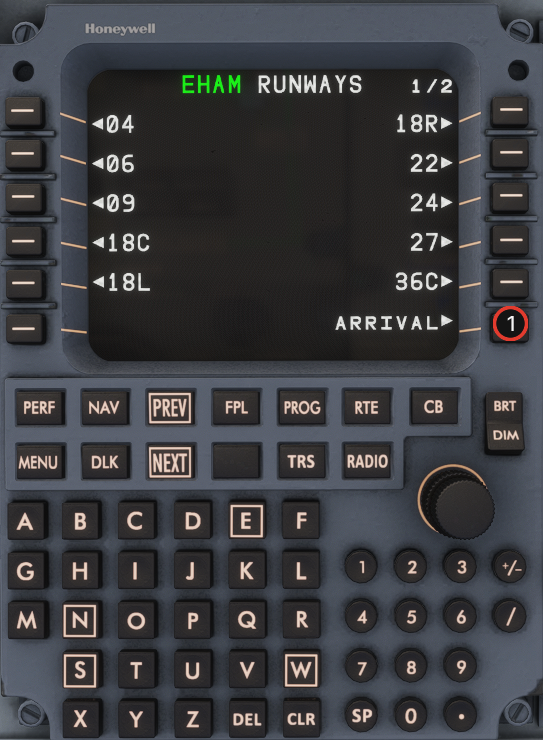 {% endcolumn %}
{% endcolumns %}
## Step 15
{% columns %}
{% column width="64%" %}
1. Select the planned approach procedure.
{% endcolumn %}
{% column width="36%" %}
{% endcolumn %}
{% endcolumns %}
## Step 15
{% columns %}
{% column width="64%" %}
1. Select the planned approach procedure.
{% endcolumn %}
{% column width="36%" %} 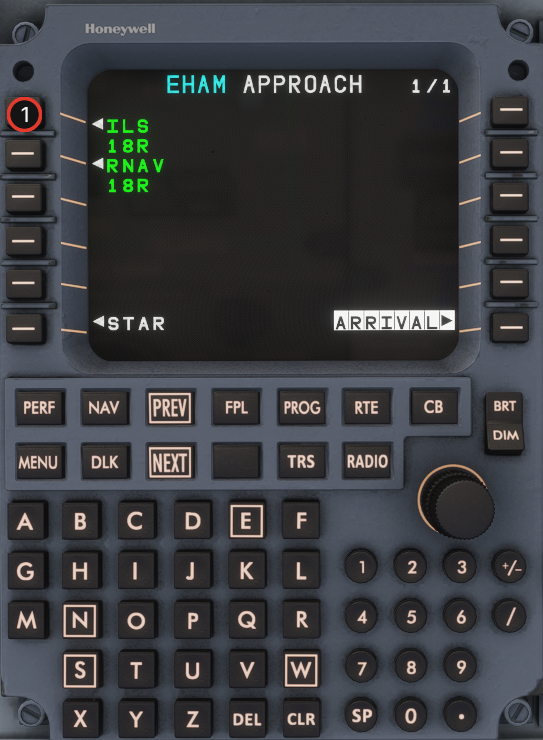 {% endcolumn %}
{% endcolumns %}
## Step 16
{% columns %}
{% column width="64%" %}
1. If you do not use an approach transition, skip directly to **STAR** selection.
{% endcolumn %}
{% column width="36%" %}
{% endcolumn %}
{% endcolumns %}
## Step 16
{% columns %}
{% column width="64%" %}
1. If you do not use an approach transition, skip directly to **STAR** selection.
{% endcolumn %}
{% column width="36%" %} 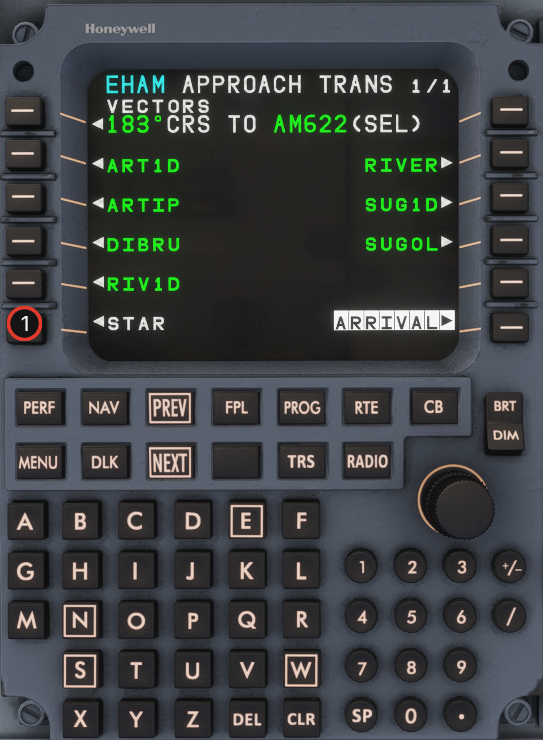 {% endcolumn %}
{% endcolumns %}
## Step 18
{% columns %}
{% column width="64%" %}
1. Select the planned STAR.
{% endcolumn %}
{% column width="36%" %}
{% endcolumn %}
{% endcolumns %}
## Step 18
{% columns %}
{% column width="64%" %}
1. Select the planned STAR.
{% endcolumn %}
{% column width="36%" %} 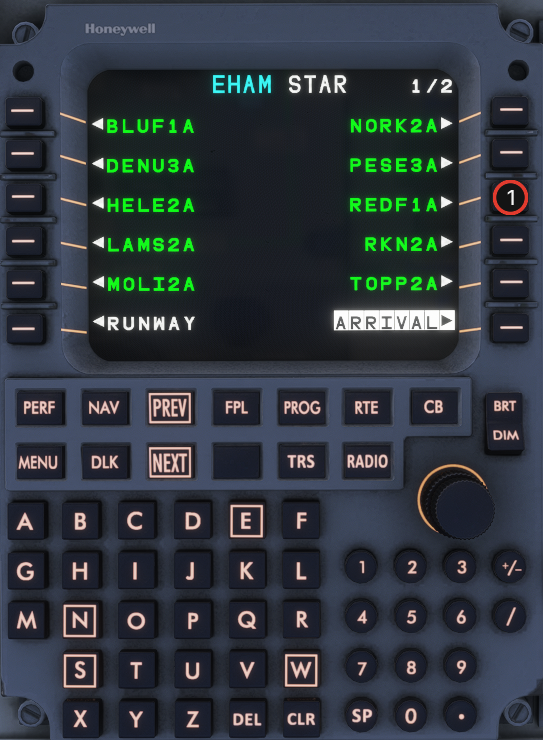 {% endcolumn %}
{% endcolumns %}
## Step 19
{% columns %}
{% column width="64%" %}
1. Confirm the selected arrival procedure.
{% endcolumn %}
{% column width="36%" %}
{% endcolumn %}
{% endcolumns %}
## Step 19
{% columns %}
{% column width="64%" %}
1. Confirm the selected arrival procedure.
{% endcolumn %}
{% column width="36%" %} 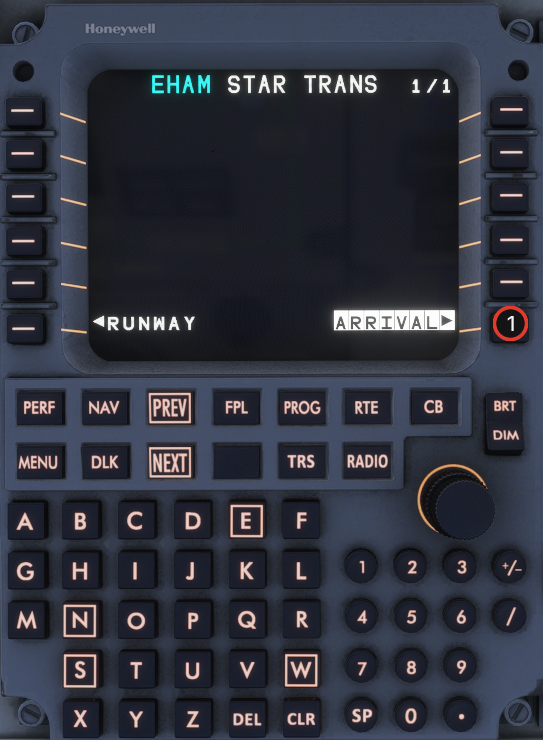 {% endcolumn %}
{% endcolumns %}
## Step 20
{% columns %}
{% column width="64%" %}
1. **INSERT/APPLY** the arrival procedure into the **MOD** flight plan.
{% endcolumn %}
{% column width="36%" %}
{% endcolumn %}
{% endcolumns %}
## Step 20
{% columns %}
{% column width="64%" %}
1. **INSERT/APPLY** the arrival procedure into the **MOD** flight plan.
{% endcolumn %}
{% column width="36%" %} 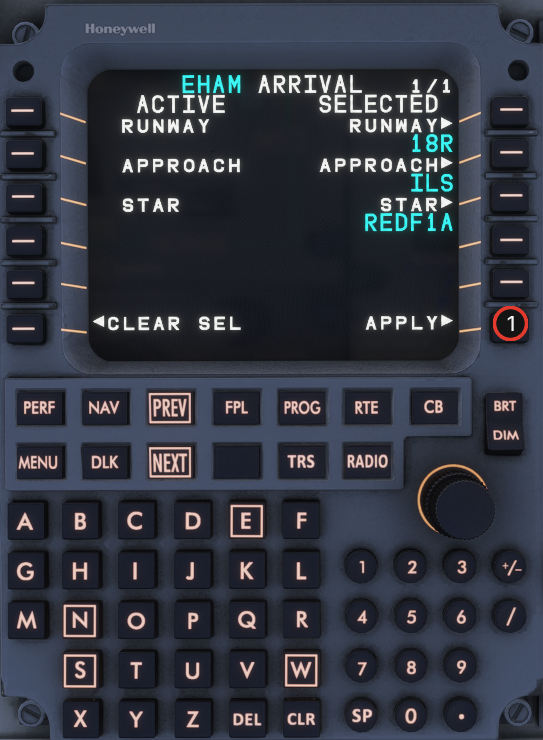 {% endcolumn %}
{% endcolumns %}
## Step 21
{% columns %}
{% column width="64%" %}
1. Review the **MOD ACTIVE FPL**.
2. **ACTIVATE** (LSK 6R).
{% endcolumn %}
{% column width="36%" %}
{% endcolumn %}
{% endcolumns %}
## Step 21
{% columns %}
{% column width="64%" %}
1. Review the **MOD ACTIVE FPL**.
2. **ACTIVATE** (LSK 6R).
{% endcolumn %}
{% column width="36%" %} 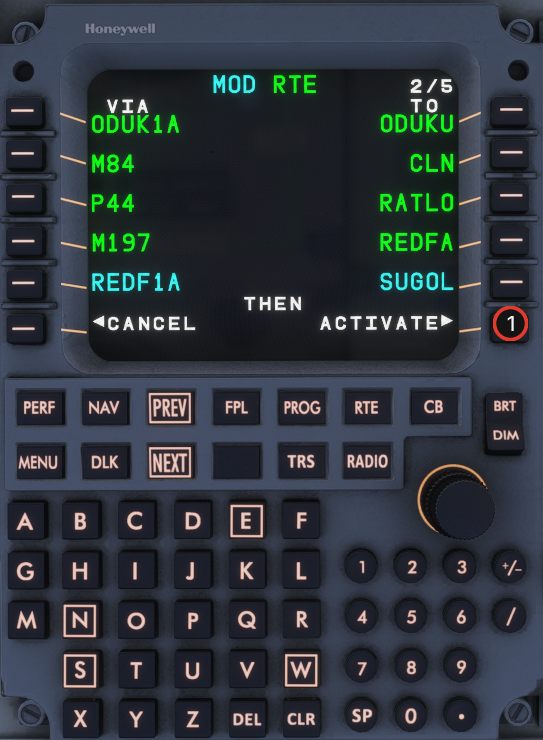 {% endcolumn %}
{% endcolumns %}
## Step 23
{% columns %}
{% column width="64%" %}
1. Press **FPL** and scan the active flight plan for discontinuities (`>>DISCONTINUITY<<`).
{% endcolumn %}
{% column width="36%" %}
{% endcolumn %}
{% endcolumns %}
## Step 23
{% columns %}
{% column width="64%" %}
1. Press **FPL** and scan the active flight plan for discontinuities (`>>DISCONTINUITY<<`).
{% endcolumn %}
{% column width="36%" %} 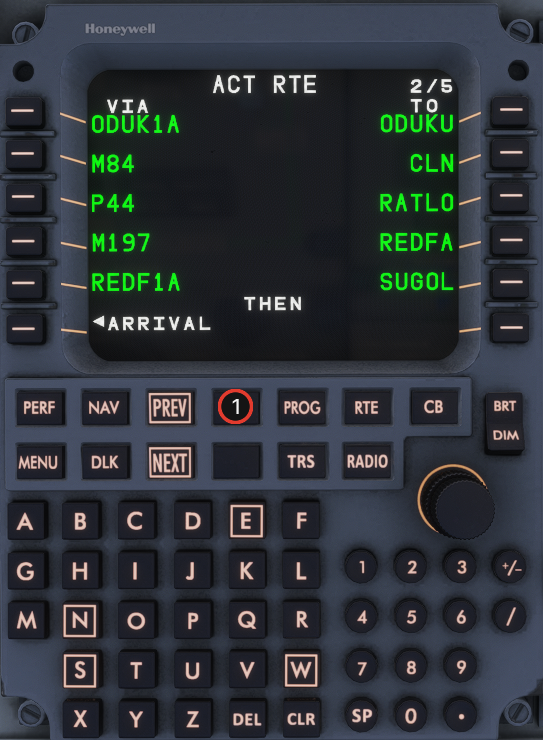 {% endcolumn %}
{% endcolumns %}
## Step 24
{% columns %}
{% column width="64%" %}
1. Use **NEXT** to walk through all flight-plan pages and check legs and constraints.
{% endcolumn %}
{% column width="36%" %}
{% endcolumn %}
{% endcolumns %}
## Step 24
{% columns %}
{% column width="64%" %}
1. Use **NEXT** to walk through all flight-plan pages and check legs and constraints.
{% endcolumn %}
{% column width="36%" %} 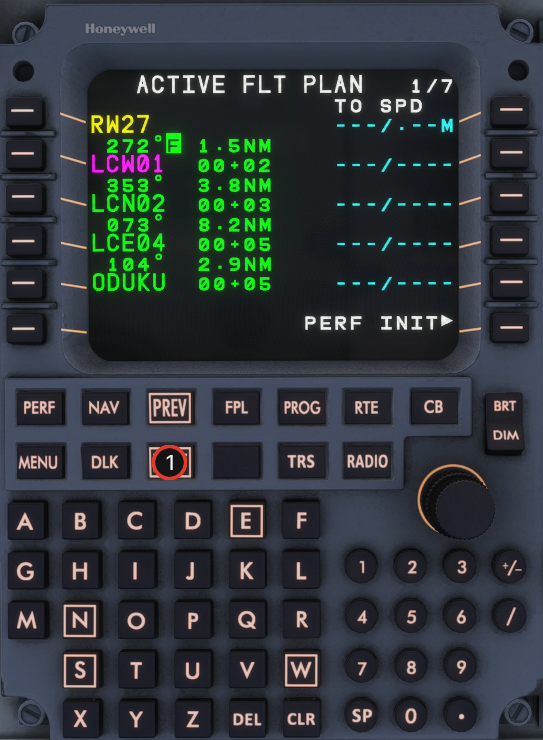 {% endcolumn %}
{% endcolumns %}
## Step 26
{% columns %}
{% column width="64%" %}
1. If a discontinuity remains (example on page 3/7), type the missing waypoint in the scratchpad (e.g. **PEVOS**).
2. Press the left LSK next to the discontinuity (dashed line) to insert the waypoint.
{% endcolumn %}
{% column width="36%" %}
{% endcolumn %}
{% endcolumns %}
## Step 26
{% columns %}
{% column width="64%" %}
1. If a discontinuity remains (example on page 3/7), type the missing waypoint in the scratchpad (e.g. **PEVOS**).
2. Press the left LSK next to the discontinuity (dashed line) to insert the waypoint.
{% endcolumn %}
{% column width="36%" %} 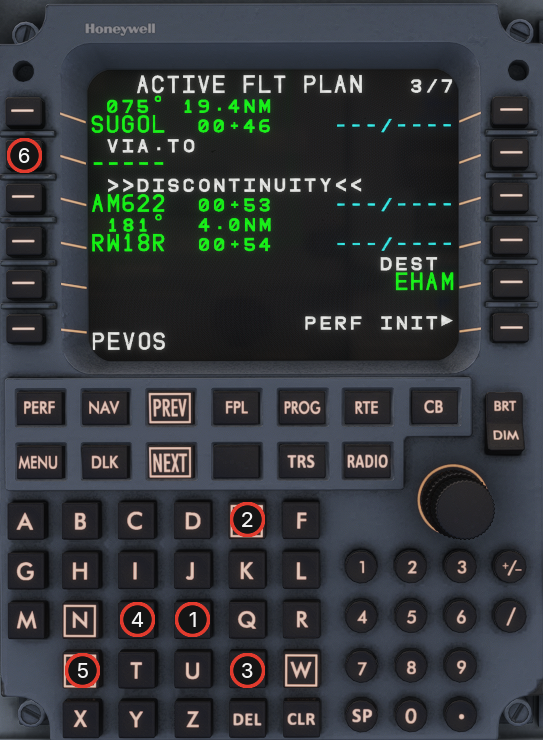 {% endcolumn %}
{% endcolumns %}
## Step 28
{% columns %}
{% column width="64%" %}
1. Press **DEL** to put `*DELETE*` in the scratchpad.
2. Delete the discontinuity dashes on the flight-plan page.
{% endcolumn %}
{% column width="36%" %}
{% endcolumn %}
{% endcolumns %}
## Step 28
{% columns %}
{% column width="64%" %}
1. Press **DEL** to put `*DELETE*` in the scratchpad.
2. Delete the discontinuity dashes on the flight-plan page.
{% endcolumn %}
{% column width="36%" %} 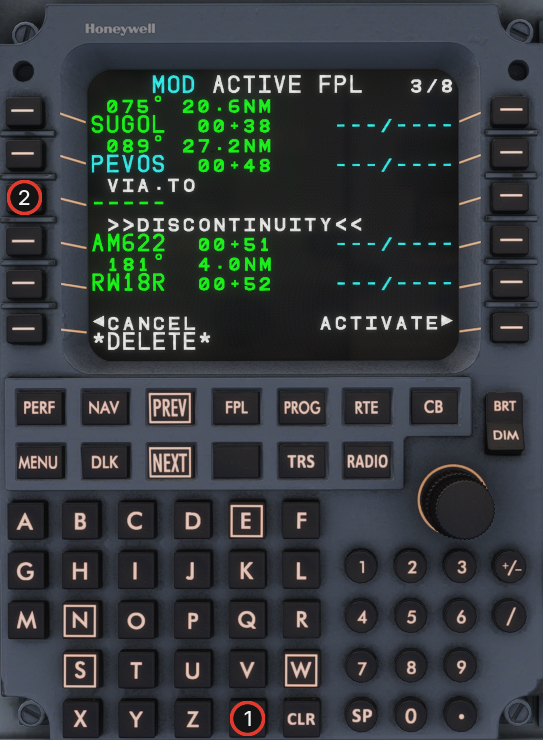 {% endcolumn %}
{% endcolumns %}
## Step 29
{% columns %}
{% column width="64%" %}
1. Review the **MOD** flight plan.
2. **ACTIVATE** (LSK 6R).
{% endcolumn %}
{% column width="36%" %}
{% endcolumn %}
{% endcolumns %}
## Step 29
{% columns %}
{% column width="64%" %}
1. Review the **MOD** flight plan.
2. **ACTIVATE** (LSK 6R).
{% endcolumn %}
{% column width="36%" %} 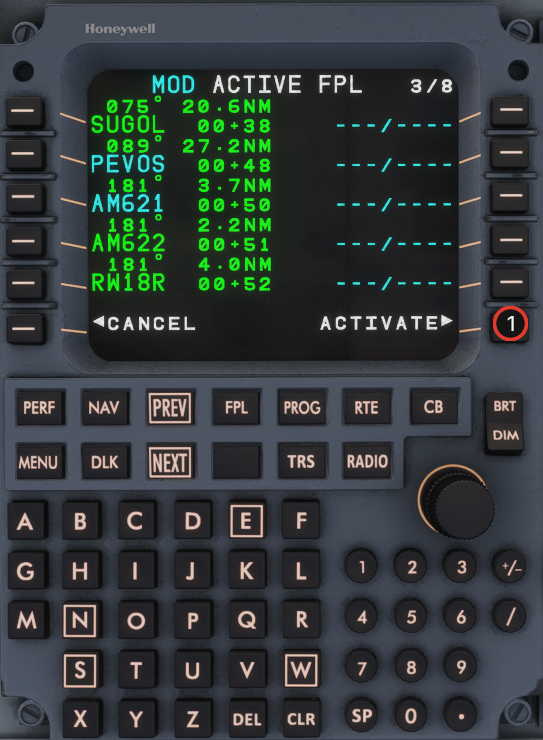 {% endcolumn %}
{% endcolumns %}
## Step 30
{% columns %}
{% column width="64%" %}
1. Press **PERF** and select **PERF INIT** (LSK 1L).
{% endcolumn %}
{% column width="36%" %}
{% endcolumn %}
{% endcolumns %}
## Step 30
{% columns %}
{% column width="64%" %}
1. Press **PERF** and select **PERF INIT** (LSK 1L).
{% endcolumn %}
{% column width="36%" %} 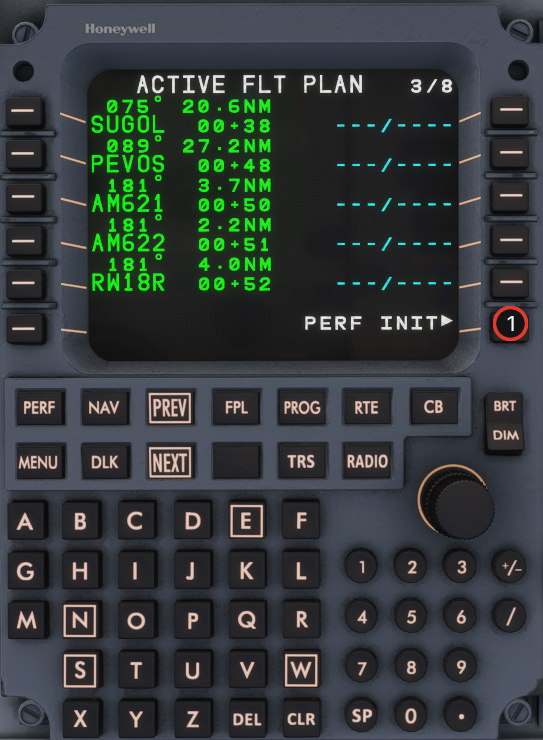 {% endcolumn %}
{% endcolumns %}
## Step 31
{% columns %}
{% column width="64%" %}
1. On **PERF INIT 1/3**, select **SEND REQST** to pull performance data from your SimBrief OFP.
{% endcolumn %}
{% column width="36%" %}
{% endcolumn %}
{% endcolumns %}
## Step 31
{% columns %}
{% column width="64%" %}
1. On **PERF INIT 1/3**, select **SEND REQST** to pull performance data from your SimBrief OFP.
{% endcolumn %}
{% column width="36%" %} 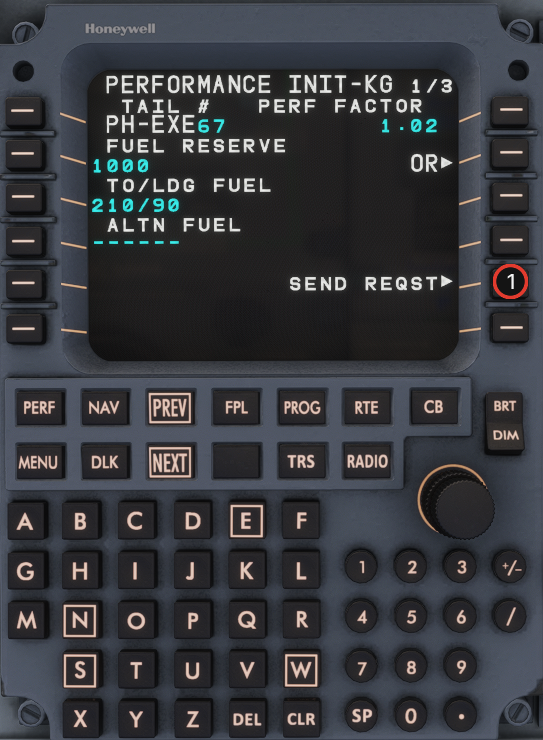 {% endcolumn %}
{% endcolumns %}
## Step 32
{% columns %}
{% column width="64%" %}
1. Press **NEXT** to **PERF INIT 2/3**.
{% endcolumn %}
{% column width="36%" %}
{% endcolumn %}
{% endcolumns %}
## Step 32
{% columns %}
{% column width="64%" %}
1. Press **NEXT** to **PERF INIT 2/3**.
{% endcolumn %}
{% column width="36%" %} 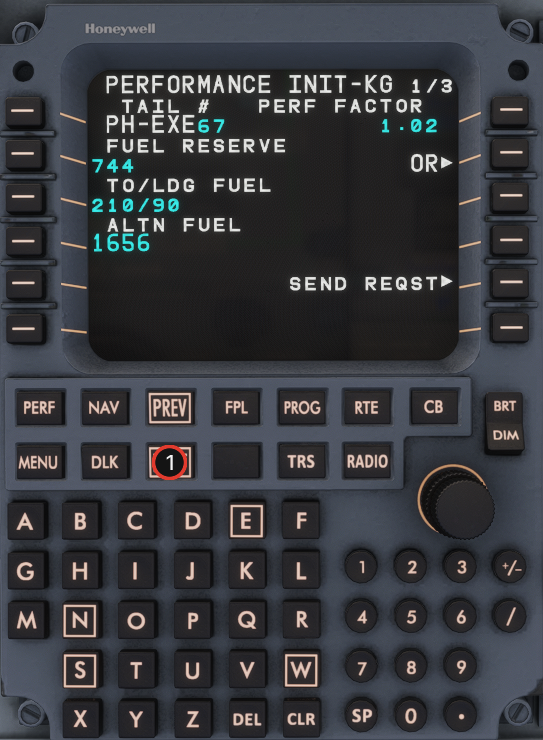 {% endcolumn %}
{% endcolumns %}
## Step 34
{% columns %}
{% column width="64%" %}
1. Enter **TO CG** from the EFB manifest (e.g. type `23.0` on the keypad).
2. Transfer the scratchpad value with the **TO CG** line-select key (LSK 5L).
{% endcolumn %}
{% column width="36%" %}
{% endcolumn %}
{% endcolumns %}
## Step 34
{% columns %}
{% column width="64%" %}
1. Enter **TO CG** from the EFB manifest (e.g. type `23.0` on the keypad).
2. Transfer the scratchpad value with the **TO CG** line-select key (LSK 5L).
{% endcolumn %}
{% column width="36%" %} 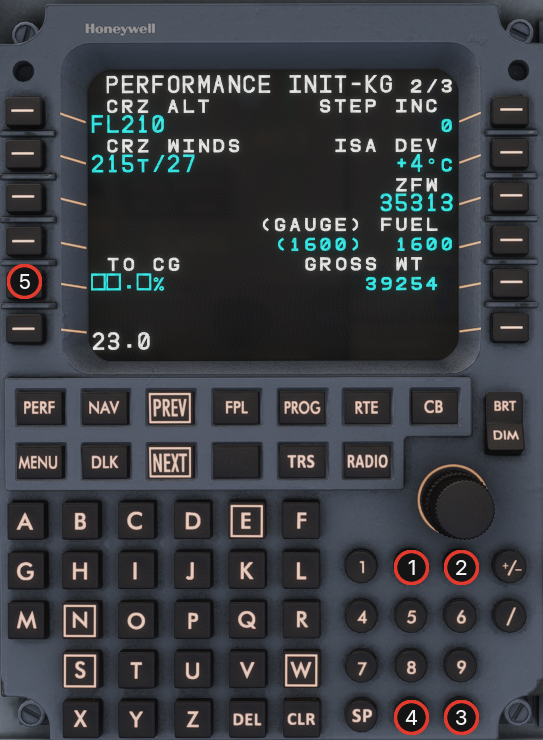 {% endcolumn %}
{% endcolumns %}
## Step 35
{% columns %}
{% column width="64%" %}
1. Press **NEXT** to **PERF INIT 3/3**.
{% endcolumn %}
{% column width="36%" %}
{% endcolumn %}
{% endcolumns %}
## Step 35
{% columns %}
{% column width="64%" %}
1. Press **NEXT** to **PERF INIT 3/3**.
{% endcolumn %}
{% column width="36%" %} 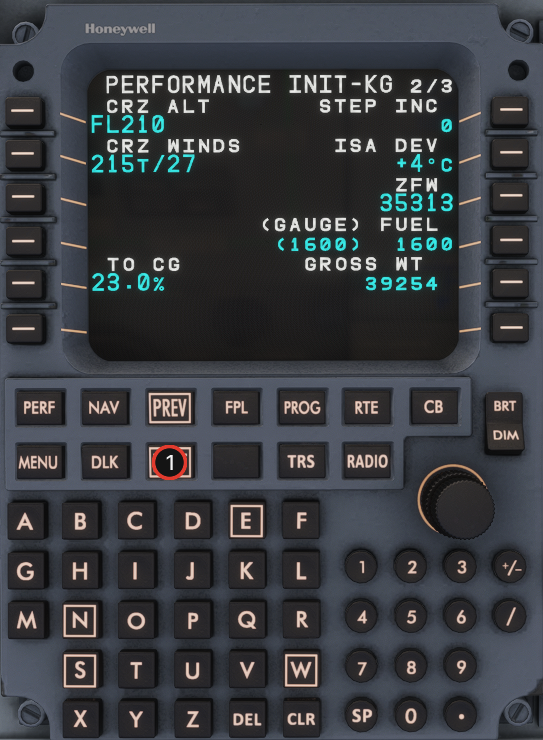 {% endcolumn %}
{% endcolumns %}
## Step 36
{% columns %}
{% column width="64%" %}
1. Press **CONFIRM INIT>** (LSK 6R, inverse white) to confirm performance initialization.
2. Without this step the vertical profile is **not** calculated — see PERF.
{% endcolumn %}
{% column width="36%" %}
{% endcolumn %}
{% endcolumns %}
## Step 36
{% columns %}
{% column width="64%" %}
1. Press **CONFIRM INIT>** (LSK 6R, inverse white) to confirm performance initialization.
2. Without this step the vertical profile is **not** calculated — see PERF.
{% endcolumn %}
{% column width="36%" %} 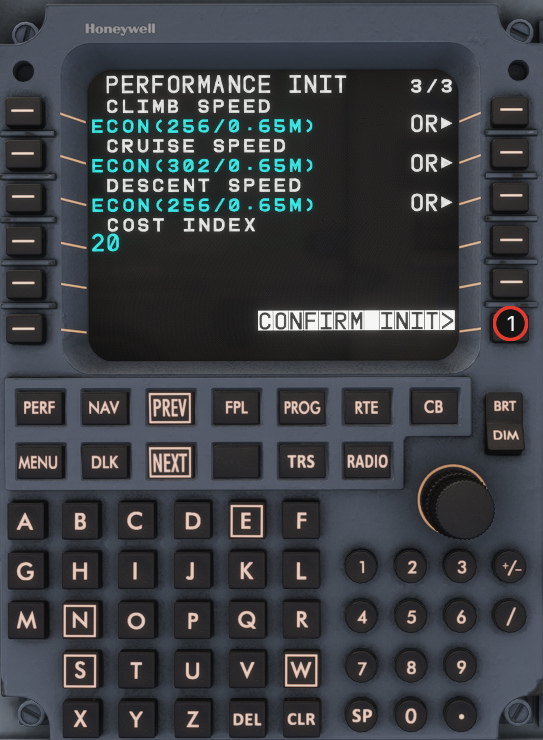 {% endcolumn %}
{% endcolumns %}
## Step 37
{% columns %}
{% column width="64%" %}
1. Select **PERF DATA>** (LSK 6R) to review the performance summary.
{% endcolumn %}
{% column width="36%" %}
{% endcolumn %}
{% endcolumns %}
## Step 37
{% columns %}
{% column width="64%" %}
1. Select **PERF DATA>** (LSK 6R) to review the performance summary.
{% endcolumn %}
{% column width="36%" %} 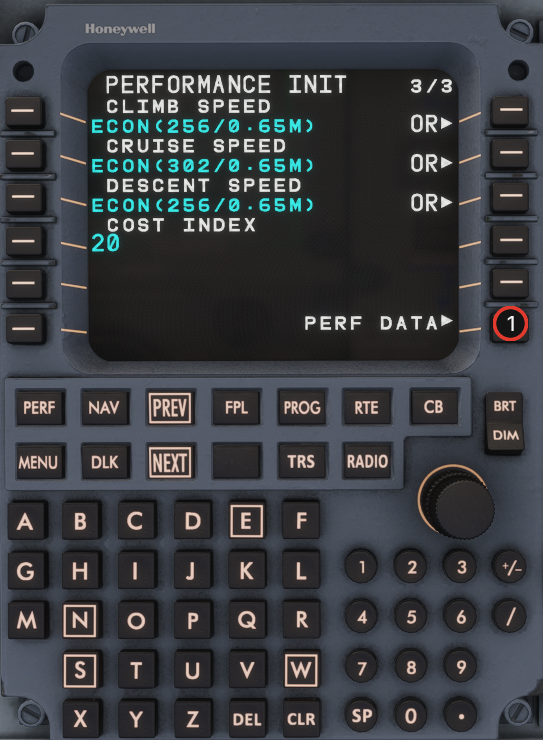 {% endcolumn %}
{% endcolumns %}
## Step 38
{% columns %}
{% column width="64%" %}
1. Select **TAKEOFF>** from the performance workflow prompts.
{% endcolumn %}
{% column width="36%" %}
{% endcolumn %}
{% endcolumns %}
## Step 38
{% columns %}
{% column width="64%" %}
1. Select **TAKEOFF>** from the performance workflow prompts.
{% endcolumn %}
{% column width="36%" %} 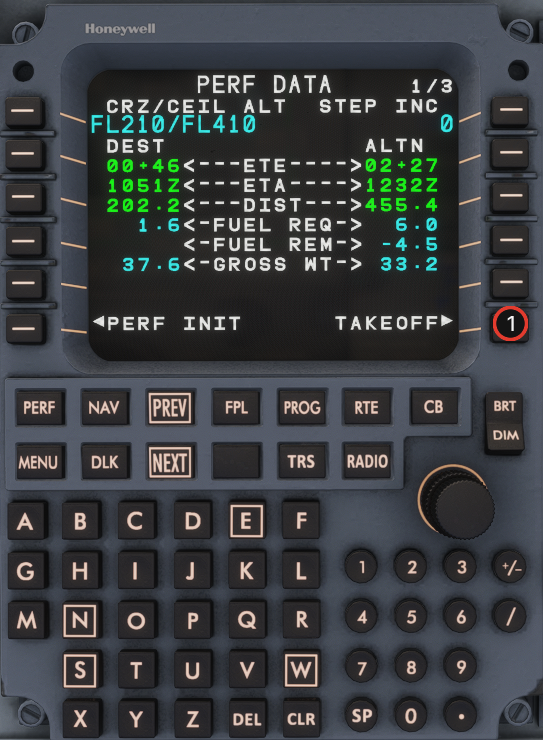 {% endcolumn %}
{% endcolumns %}
## Step 39
{% columns %}
{% column width="64%" %}
1. Enter **V1**, **VR**, **V2**, and **VFS** from the EFB manifest / loadsheet.
{% endcolumn %}
{% column width="36%" %}
{% endcolumn %}
{% endcolumns %}
## Step 39
{% columns %}
{% column width="64%" %}
1. Enter **V1**, **VR**, **V2**, and **VFS** from the EFB manifest / loadsheet.
{% endcolumn %}
{% column width="36%" %} 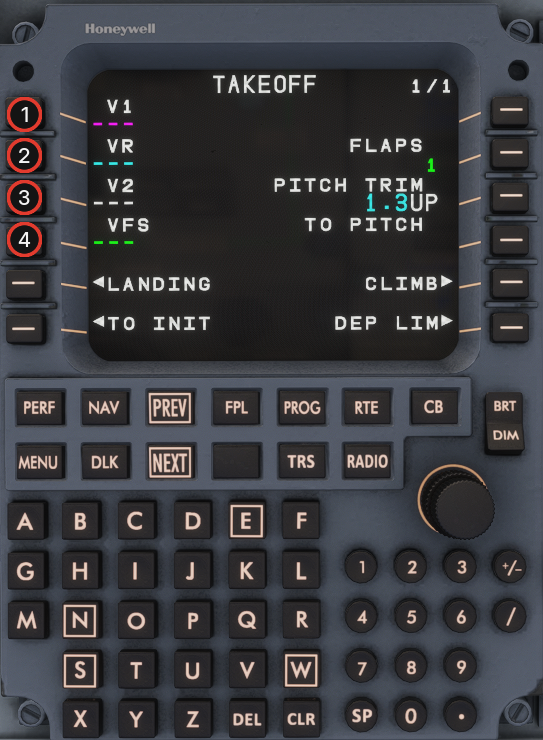 {% endcolumn %}
{% endcolumns %}
## Step 40
{% columns %}
{% column width="64%" %}
1. Preflight MCDU setup complete — you are ready for departure.
{% endcolumn %}
{% column width="36%" %}
{% endcolumn %}
{% endcolumns %}
## Step 40
{% columns %}
{% column width="64%" %}
1. Preflight MCDU setup complete — you are ready for departure.
{% endcolumn %}
{% column width="36%" %} 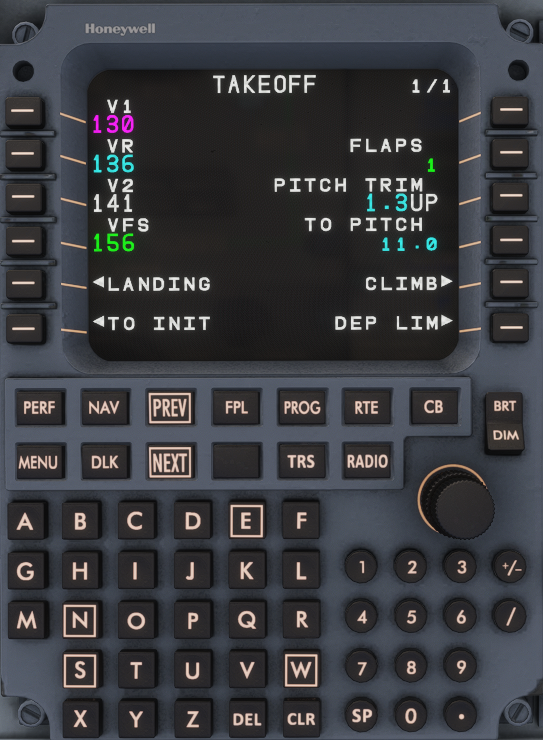 {% endcolumn %}
{% endcolumns %}
{% endcolumn %}
{% endcolumns %}