> For the complete documentation index, see [llms.txt](https://docs.flightsim-studio.com/llms.txt). Markdown versions of documentation pages are available by appending `.md` to page URLs; this page is available as [Markdown](https://docs.flightsim-studio.com/boeing-727/systems/flight-instruments.md).
# Flight Instruments
### VERTICAL SPEED INDICATOR
*Indicates airplane rate of climb or descent.*
| 
| (1) Vertical Speed Scale
- Indicates vertical speed in feet per minuate x 1000.
- Scale is 0 to 6000 fpm.
(2) Vertical Speed Pointer
- An accelerometer is incorporated to provide instantaneous reading.
- Positioned by vertical accelerometer and rate of static pressure change.
|
| -------------------------------------------------------------------------------------------------------------------------------------------------------------------------------------------------------------------------------------------------------------------------------------------------- | ------------------------------------------------------------------------------------------------------------------------------------------------------------------------------------------------------------------------------------------------------------------------------------------------------------------------------------------------------------------------------------- |
### PNEUMATIC ALTIMETER
*Indicates airplane altitude above reference pressure.*
| 
| (1) Altitude Window
- Indicates vertical speed in feet per minuate x 1000.
- Scale is 0 to 6000 fpm.
(2) Millibars Window
- Displays barometric setting in millibars as manually set with the BARO set knob
(3) Inches Of Mercury Window
- Displays barometric setting in inches of mercury as manually set with the BARO set knob
(4) Barometric Set Knob
- An accelerometer is incorporated to provide instantaneous reading.
- Positioned by vertical accelerometer and rate of static pressure change.
(5) 100-Foot Pointer
- Indicates feet on radial dial. Each mark is 20 ft, each digit is 100 ft.
(6) Inner Altitude Bug
- Manually positioned by altitude bug set knob.
|
| --------------------------------------------------------------------------------------------------------------------------------------------------------------------------------------------------------------------------------------------------------------------------------------------- | ------------------------------------------------------------------------------------------------------------------------------------------------------------------------------------------------------------------------------------------------------------------------------------------------------------------------------------------------------------------------------------------------------------------------------------------------------------------------------------------------------------------------------------------------------------------------------------------------------------------------------------------------------------------------------------------------------------------------------------------------------------------------------------------------------------------------------------------------------------------------------------------------------------------------------------------------------------ |
### PNEUMATIC AIRSPEED INDICATOR
*Indicates airplane airspeed in knots and mach.*
| 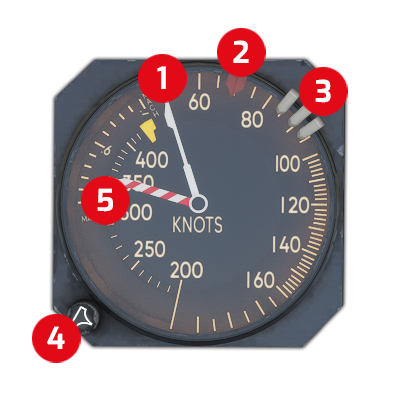
| (1) Indicated Airspeed Pointer
- Pointer indicates 0-200 KIAS on outer scale; 200-400 KIAS on inner scale.
- Pointer indicates Mach on window scale.
(2) Inner Airspeed bug
- Reference speed for autothrottle.
- Manually positioned by (4).
(3) Airspeed Bugs
- Three manually positioned reference bugs (on outer ring).
(4) Airspeed Bug Set Knob
- Turned to position inner airspeed bug.
(5) Max Operating Speed Pointer
- Indicates the max operating speed (Vmo) for existing altitude.
|
| ------------------------------------------------------------------------------------------------------------------------------------------------------------------------------------------------------------------------------------------------------------------------------------------------------ | ----------------------------------------------------------------------------------------------------------------------------------------------------------------------------------------------------------------------------------------------------------------------------------------------------------------------------------------------------------------------------------------------------------------------------------------------------------------------------------------------------------------------------------------------------------------------------------------------------------------------------------------------------------------------------------------------------------------- |
### SAT/TAS INDICATOR
*Indicates airplane standard air temperature and true airspeed*
| 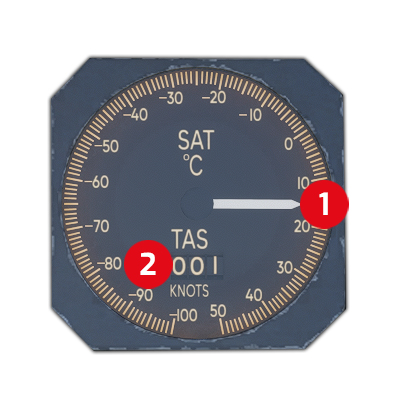
| (1) Static Air Temperature Indicator
- Indicates static air temperature.
(2) True Airspeed Indicator
|
| ------------------------------------------------------------------------------------------------------------------------------------------------------------------------------------------------------------------------------------------------------------------------------------------- | ------------------------------------------------------------------------------------------------------------------------------------------------------------------------------------------------------------------- |
### RADIO MAGNETIC INDICATOR
*Combines a magnetic compass with navigation signals from VORs and NDBs to provide bearing information to the selected station.*
| 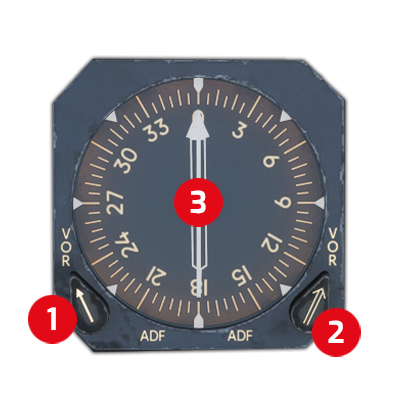
| (1) No. 1 VOR/ADF Selector
- When turned to the left (vertical), selects No. 1 VOR information to the No. 1 VOR/ADF Pointer.
- When turned to the right (horizontal), selects No. 1 ADF information to the No. 1 VOR/ADF pointer.
(2) No. 2 VOR/ADF Selector
- When turned to the left (vertical), selects No. 2 VOR information to the No. 2 VOR/ADF Pointer.
- When turned to the right (horizontal), selects No. 2 ADF information to the No. 2 VOR/ADF pointer.
(3) No. 1 & 2 VOR/ADF pointer
- Points towards the selected station based on the given source from (1) & (2).
|
| ----------------------------------------------------------------------------------------------------------------------------------------------------------------------------------------------------------------------------------------------------------------------------- | ----------------------------------------------------------------------------------------------------------------------------------------------------------------------------------------------------------------------------------------------------------------------------------------------------------------------------------------------------------------------------------------------------------------------------------------------------------------------------------------------------------------------------------------------------------------------------------------------------------------------------------------------------------------------------------------------------------------------- |
### HORIZONTAL SITUATION INDICATOR
*Integrates the directional gyro, course deviation indicator, and glide slope to provide comprehensive display of flight path relative to a chosen navigation source.*
| 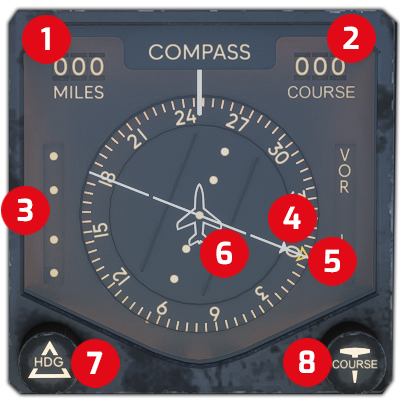
| (1) Miles Window
- Displays associated DME distance.
(2) Course Window
- Displays course selected by pilot.
(3) Glideslope Scale & Deviation Pointer
- In conjunction with deviation pointer indicates vertical deviation above or below the glideslope.
- Each mark indicates 1/4-degree.
- Vertical deviation pointer out of view with VOR selected.
(4) To-From Indicator
- Points toward a line through the VOR station perpendicular to the seleccted course.
(5) Heading Bug
- Indicates heading selected by pilot.
(6) Course Deviation Bar & Scale
- As a reference on the course deviation scale, indicates deviation from the selected course.
- Each dot equals 5-degrees on VOR and 1 1/4-degrees on LOC.
(7) Heading Control
- Rotated to set heading bug.
(8) Course Control
- Rotated to set course indicator.
|
| ----------------------------------------------------------------------------------------------------------------------------------------------------------------------------------------------------------------------------------------------------------------------------- | ----------------------------------------------------------------------------------------------------------------------------------------------------------------------------------------------------------------------------------------------------------------------------------------------------------------------------------------------------------------------------------------------------------------------------------------------------------------------------------------------------------------------------------------------------------------------------------------------------------------------------------------------------------------------------------------------------------------------------------------------------------------------------------------------------------------------------------------------------------------------------------------------------------------------------------------------------------------------------------------------------------------------------------------------------------------------------------------------------------------------------------------------------------------------- |
### ATTITUDE DIRECTION INDICATOR
*Provides information about the orientation of the aircraft relative to the horizon.*
| 
| (1) Go-Around Light
- Illuminates to indicate flight director go-around mode.
(2) Bank Angle Scale
- Displays roll attitude as indicated by roll index (4).
(3) Max Bank Angle
- Displays the maximum allowed bank angle.
(4) Roll Index
- Indicates roll attitude on bank angle scale (2).
(5) Pitch Scale
- Displays pitch attitude in reference to airplane symbol.
(6) Fast-Slow Indicator
- Indicates airpseed deviation fast (F) or slow (S).
- References to the captain's inner airspeed bug.
(7) Glideslope Deviation Scale & Pointer
- Indicates deviation from center of glideslope beam.
(8) Expanded Localizer Indicator
- Lateral movement from center line indicates displacement from localizer.
(9) Test Switch
- Push-to-test switch checks the indicator's amplifiers and servos.
(10) Slip Indicator
- Skid ball indicates amount of yaw.
|
| ----------------------------------------------------------------------------------------------------------------------------------------------------------------------------------------------------------------------------------------------------------------------------- | ----------------------------------------------------------------------------------------------------------------------------------------------------------------------------------------------------------------------------------------------------------------------------------------------------------------------------------------------------------------------------------------------------------------------------------------------------------------------------------------------------------------------------------------------------------------------------------------------------------------------------------------------------------------------------------------------------------------------------------------------------------------------------------------------------------------------------------------------------------------------------------------------------------------------------------------------------------------------------------------------------------------------------------------------------------------------------------------------------------------------------------------------------------------------------------------------------------------------------------------------------------------------- |
### INSTRUMENT COMPARATOR
*Compares data outputs of flight instruments and displays an appropriate warning when the captain's and first officer's instruments disagree.*
| 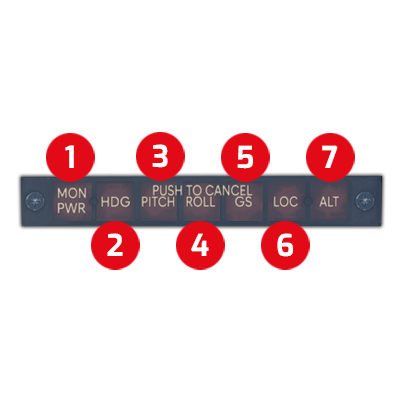
| (1) Monitor Power Light
- Illuminates at loss of electrical power to the comparator.
(2) Heading Light
- Indicates a heading difference of 6 degrees between HSIs.
(3) Horizon Pitch Light
- Indicates a difference of 4 to 6 degrees in pitch between ADIs.
(4) Roll Pitch Light
- Indicates a difference of 4 to 6 degrees in roll between ADIs.
(5) Glideslope Light
- Both nav receivers mus be tuned to an active localizer freuqnecy; GS flags not in view.
- On at 3/4 to 1-dot difference on HSIs.
(6) Localizer Light
- Indicates heading selected by pilot.
(7) Radio Altimeter Light
|
| ----------------------------------------------------------------------------------------------------------------------------------------------------------------------------------------------------------------------------------------------------------------------------------------------- | --------------------------------------------------------------------------------------------------------------------------------------------------------------------------------------------------------------------------------------------------------------------------------------------------------------------------------------------------------------------------------------------------------------------------------------------------------------------------------------------------------------------------------------------------------------------------------------------------------------------------------------------------------------------------------------------------------------------------------------------------------------------------------------------------------------------------------------------------------------------------------------------------------------------------------------------------------------------------------------------------------------------------- |
### RADIO ALTIMETER INDICATOR
*Provides a visual display of airplane terrain clearance, from 0 to 2500 ft. A light will warn the crew that the airplane is at or below the selected altitude.*
| 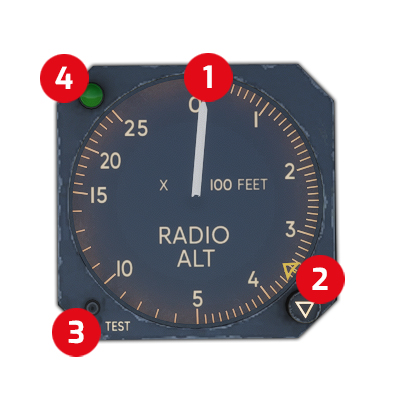
| (1) Altitude Pointer
- Indicates height above ground level (AGL).
(2) Bug & Control
- Rotated to position bug to selected height
(3) Test Switch
- Drives altitude pointer to 40 ft and DH light will illuminate.
(4) DH Light
- Illuminated if airplane is at or below selected height.
|
| ----------------------------------------------------------------------------------------------------------------------------------------------------------------------------------------------------------------------------------------------------------------------------------------- | -------------------------------------------------------------------------------------------------------------------------------------------------------------------------------------------------------------------------------------------------------------------------------------------------------------------------------------------------------------------------------------------------------------------------------------------------------- |